
Criando aplicação MVC utilizando DOTNET Core no GNU/Linux
Esse artigo é uma continuação da trilogia de artigos propostos sobre DotNetCore no GNU/Linux. Criaremos uma aplicação Web MVC básica, utilizando a ferramenta VSCode.
[ Hits: 7.972 ]
Por: Tiago Zaniquelli em 10/07/2017

Criando nossa primeira aplicação Web do zero
Já ressalto que o objetivo é ter nossa aplicação executando, não estou me preocupando com o Layout, se está bonito ou feio. Já aviso que estará feio. (hehehehe)
Queremos ao final ter nossa aplicação funcionando, ok?
Vamos utilizar novamente o yo aspnet para criar nossa aplicação. Após executá-lo, escolha a opção "Empty Web Application" e depois dê um nome para a sua aplicação, no meu caso coloquei "WebTeste", conforme ilustra a imagem 5.

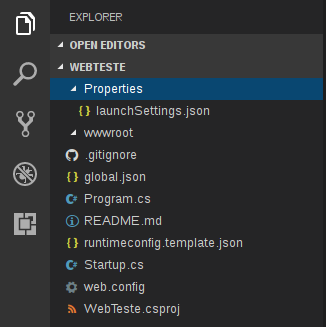
File → Open Folder
e escolha o local onde você criou a sua aplicação. Deverá aparecer no canto esquerdo, algo igual ou parecido com a imagem 6.
A aplicação que criaremos será bem simples, terá uma página inicial onde poderá criar uma pessoa.
Clicando no "Criar", será exibida uma tela onde pedirá CPF e Nome. Clicando em "Salvar", será direcionado para uma página onde exibiremos os dados preenchidos. Não terá nenhuma interação com banco de dados, apenas irá manusear dados em sessão.
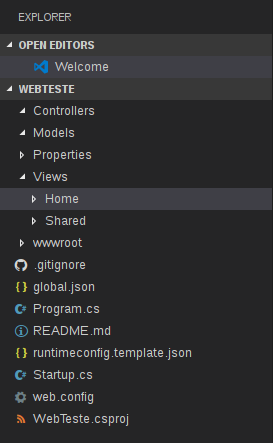
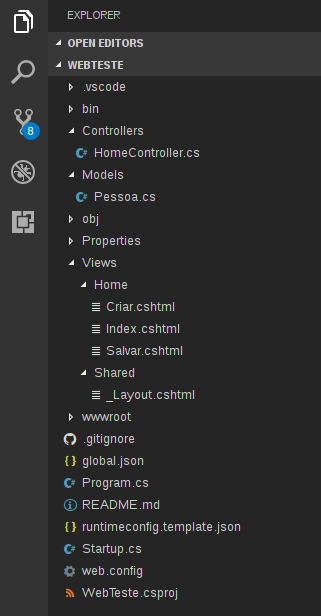
Vamos agora criar as 3 pastas fundamentais do MVC (Controllers, Models e Views) e dentro de Views criamos outras duas pastas (Shared e Home).
Nossa aplicação ficará com a estrutura da imagem 7.
O que é importante no arquivo abaixo, são as referências inseridas, então no seu arquivo coloque apenas a parte das referências o resto deixe como estava.
Arquivo WebTeste.csproj
<Project ToolsVersion="15.0" Sdk="Microsoft.NET.Sdk.Web">

  <PropertyGroup>
    <TargetFramework>netcoreapp1.0</TargetFramework>
  </PropertyGroup>

  <ItemGroup>
    <Folder Include="wwwroot\" />
  </ItemGroup>

  <ItemGroup>
    <PackageReference Include="Microsoft.AspNetCore" Version="1.1.0" />
    <PackageReference Include="Microsoft.AspNetCore.Mvc" Version="1.1.0" />
    <PackageReference Include="Microsoft.AspNetCore.Diagnostics" Version="1.1.0" />
    <PackageReference Include="Microsoft.AspNetCore.Razor.Tools" Version="1.0.0-preview2-final" type="build" />
    <PackageReference Include="Microsoft.AspNetCore.Server.IISIntegration" Version="1.1.0" />
    <PackageReference Include="Microsoft.AspNetCore.Server.Kestrel" Version="1.1.0" />
    <PackageReference Include="Microsoft.AspNetCore.SpaServices" Version="1.1.0" />
    <PackageReference Include="Microsoft.AspNetCore.StaticFiles" Version="1.1.0" />
    <PackageReference Include="Microsoft.Extensions.Configuration.EnvironmentVariables" Version="1.1.0" />
    <PackageReference Include="Microsoft.Extensions.Configuration.Json" Version="1.1.0" />
    <PackageReference Include="Microsoft.Extensions.Configuration.CommandLine" Version="1.1.0" />
    <PackageReference Include="Microsoft.Extensions.Logging" Version="1.1.0" />
    <PackageReference Include="Microsoft.Extensions.Logging.Console" Version="1.1.0" />
    <PackageReference Include="Microsoft.Extensions.Logging.Debug" Version="1.1.0" />
    <PackageReference Include="Microsoft.Extensions.Options.ConfigurationExtensions" Version="1.1.0" />
  </ItemGroup>

</Project>
Outro arquivo que devemos alterar é Startup.cs, deverá ficar parecido com o arquivo abaixo.
Arquivo Startup.cs
using System;
using System.Collections.Generic;
using System.Linq;
using System.Threading.Tasks;
using Microsoft.AspNetCore.Builder;
using Microsoft.AspNetCore.Http;
using Microsoft.AspNetCore.Hosting;
using Microsoft.Extensions.Configuration;
using Microsoft.Extensions.DependencyInjection;
using Microsoft.Extensions.Logging;
using Microsoft.AspNetCore.Mvc.ViewFeatures;
using WebTeste.Models;

namespace WebTeste
{
    public class Startup
    {
        // This method gets called by the runtime. Use this method to add services to the container.
        // For more information on how to configure your application, visit https://go.microsoft.com/fwlink/?LinkID=398940
       public Startup(IHostingEnvironment env)
        {
            var builder = new ConfigurationBuilder()
                .SetBasePath(env.ContentRootPath)
                .AddJsonFile("appsettings.json", optional: false, reloadOnChange: true)
                .AddJsonFile($"appsettings.{env.EnvironmentName}.json", optional: true);

            builder.AddEnvironmentVariables();
            Configuration = builder.Build();
        }

        public IConfigurationRoot Configuration { get; }

        public void ConfigureServices(IServiceCollection services)
        {
            services.AddMvc();
            services.AddSingleton();
        }

        // This method gets called by the runtime. Use this method to configure the HTTP request pipeline.
        public void Configure(IApplicationBuilder app, IHostingEnvironment env, ILoggerFactory loggerFactory)
        {
            loggerFactory.AddConsole(Configuration.GetSection("Logging"));
            loggerFactory.AddDebug();

            if (env.IsDevelopment())
            {
                app.UseDeveloperExceptionPage();
            }
            else
            {
                app.UseExceptionHandler("/Home/Error");
            }

            app.UseStaticFiles();

            app.UseMvc(routes =>
            {
                routes.MapRoute(
                    name: "default",
                    template: "{controller=Home}/{action=Index}/{id?}");
            });
        }
    }
}
Após a configuração dos arquivos acima, eu costumo fazer um pré-build para verificar se está tudo caminhando bem. Para isso, acesse, via terminal, a pasta da sua aplicação e execute os seguintes comandos:
# dotnet restore
→ Carregará as dependências necessários, no caso as que configuramos no arquivo ".csproj".
No caso, deve exibir um erro de build apontando para a nossa pasta Models, pois até o momento apenas colocamos os arquivos, mas ainda não escrevemos nada neles. O erro deve ser igual, ou parecido, com o da imagem 9.

Arquivo Controllers/HomeController.cs
using System;
using System.Collections.Generic;
using System.Linq;
using System.Threading.Tasks;
using Microsoft.AspNetCore.Mvc;
using WebTeste.Models;

namespace mvcTeste.Controllers{
    public class HomeController : Controller{
        public IActionResult Index(){
            return View();
        }

        public IActionResult Criar(){
            var pessoa = new Pessoa();
            return View(pessoa);
        }

        [HttpPost]
        public IActionResult Criar(Pessoa obj){
            TempData["nome"] = obj.Nome;
            TempData["CPF"] = obj.CPF;
            return RedirectToAction("Salvar");
        }

        public IActionResult Salvar()
        {
            var pessoa = new Pessoa();
            pessoa.Nome = (string)TempData["nome"];
            pessoa.CPF = (string)TempData["CPF"];
            return View(pessoa);
        }
    }
}
Arquivo Models/Pessoa.cs
using System;
using System.Collections.Generic;
using System.ComponentModel.DataAnnotations;
using System.Linq;
using System.Threading.Tasks;

namespace WebTeste.Models
{

    public class Pessoa
    {
        public Pessoa(){

        }

        [Required]
        [MinLength(4)]
        [Display( Name = "Nome")]
        public string Nome {get; set;}

        [Display( Name = "CPF")]
        public string CPF {get; set;}
    }
}
Arquivo Views/Home/Criar.cshtml
@using WebTeste.Models
@model Pessoa

@{
    Layout = "/Views/Shared/_Layout.cshtml";
    ViewBag.Tittle = "Criar Pessoa";
}

<div class="jumbotron">
    <h1>ASP.NET MVC Core</h1>
    <p class="lead">Criar uma nova pessoa. Preenche os campos e depois clique no salvar.</p>
</div>

@using (Html.BeginForm())
{
    <fieldset>
        <legend>Criar uma nova pessoa</legend>
        <div class="editor-label">
            @Html.LabelFor(model => model.CPF)
        </div>
        <div class="editor-field">
            @Html.TextBoxFor(model => model.CPF)
        </div>


        <div class="editor-label">
            @Html.LabelFor(model => model.Nome)
        </div>
        <div class="editor-field">
            @Html.TextBoxFor(model => model.Nome)
        </div>

        <input type="submit" value="Salvar" />

    </fieldset>

<p><br></p>
}
Arquivo Views/Home/Index.cshtml
@{
    Layout = "/Views/Shared/_Layout.cshtml";
    ViewBag.Tittle = "Home Page";
}

<div class="jumbotron">
    <h1>ASP.NET Core MVC Demo </h1>
    <p class="lead"> Preencher e enviar o formulário. </p>
    <p><a href="/Home/Criar" class="btn btn-primary btn-large">Criar »</a></p>
</div>
Arquivo Views/Home/Salvar.cshtml
@model WebTeste.Models.Pessoa

@{
    Layout = "/Views/Shared/_Layout.cshtml";
    ViewBag.Tittle = "Lendo a sessão";
}

<div class="jumbotron">
    <h1>ASP.NET Core MVC</h1>
    <p class="lead">Recebendo os dados da sessão</p>
    <p><a href="/Home" class="btn btn-primary btn-large">Voltar para Home</a>
</div>

<div>
    <p>CPF: @(Model != null ? Model.CPF : "")</p>
    <p>Nome: @(Model != null ? Model.Nome : "") </p>
</div>

<p><br></p>
Arquivo Views/Shared/_Layout.cshtml
<!DOCTYPE html>
<html>
    <head>
        <meta charset="utf-8" />
        <meta name="viewport" content="width=device-width, initial-scale=1.0">
        <title>Testando - ASP.NET MVC Core </title>
        <link rel="stylesheet" href="https://maxcdn.bootstrapcdn.com/bootstrap/3.3.7/css/bootstrap.min.css" integrity="sha384-BVYiiSIFeK1dGmJRAkycuHAHRg32OmUcww7on3RYdg4Va+PmSTsz/K68vbdEjh4u" crossorigin="anonymous">
    </head>

    <body>
        <div class="navbar navbar-inverse navbar-fixed-top">
            <div class="container">
                <div class="navbar-header">
                    <button type="button" class="navbar-toggle" data-toggle="collapse" data-target=".navbar-collapse">
                        <span class="icon-bar"></span>
                        <span class="icon-bar"></span>
                        <span class="icon-bar"></span>
                    </button>
                </div>

                <div class="navbar-collapse collapse">
                    <ul class="nav navbar-nav">
                        <li><a href="/">Home</a></li>
                    </ul>
                </div>
            </div>
        </div>

        <div class="container body-content">
            @RenderBody()
            <footer>
                <p>© @DateTime.Now.Year - Minha primeira aplicação dotnet core</p>
            </footer>
        </div>
    </body>

</html>
</div>
2. Criando nossa primeira aplicação Web do zero
3. Testando a aplicação
Criando uma WEBApi utilizando dotnet core e vscode
Convergência entre segurança física e lógica
Configurando DOTNET Core e instalando VSCode no Linux
Seja Legal, não use softwares piratas!
Implementando Cacti em distribuições Debian
ZappWM: Desktop e mini-ambiente para Linux!
Instalando o Kink - Monitoração de tinta de impressoras HP e Epson
Compiz - Conhecendo a fundo II
Muito bom!
-----------------------------------------
---- Linux Counter #606350 ----
Patrocínio

Destaques
Artigos
O Journal no Linux para a guarda e consulta de logs do sistema
A evolução do Linux e as mudanças que se fazem necessárias desde o seu lançamento
Maquina modesta - a vez dos navegadores ferrarem o usuario
Fscrypt: protegendo arquivos do seu usuário sem a lentidão padrão de criptograr o disco
Dicas
Sway no Arch Linux: configuração Inicial sem enrolação
Resolvendo o bloqueio do Módulo Warsaw no Arch Linux (Porta 30900)
Tópicos
Continuando meus tópicos anteriores (1)
Saída de loop após teste de if. (2)
Governo da França vai trocar Windows por Linux (9)
Warsaw não é reconhecido no Google Chrome 147.0.7727.55 [RESOLVIDO] (9)
Top 10 do mês
-

Xerxes
1° lugar - 145.216 pts -

Fábio Berbert de Paula
2° lugar - 76.322 pts -

Buckminster
3° lugar - 46.612 pts -

Alberto Federman Neto.
4° lugar - 43.918 pts -

Alessandro de Oliveira Faria (A.K.A. CABELO)
5° lugar - 32.523 pts -

edps
6° lugar - 30.254 pts -

Sidnei Serra
7° lugar - 27.093 pts -

Mauricio Ferrari (LinuxProativo)
8° lugar - 23.771 pts -

Daniel Lara Souza
9° lugar - 22.683 pts -

Andre (pinduvoz)
10° lugar - 20.839 pts
Scripts

A maior comunidade GNU/Linux da América Latina! Artigos, dicas, tutoriais, fórum, scripts e muito mais. Ideal para quem busca auto-ajuda.
Site hospedado por:
